Z80 (28)
Retro Challenge 2024/10 Prize
2024 marks the 10 year anniversary since I entered the Retro Challenge in... hmmm... let me see now... that'll be... 2014! Yes, I remember it…
Etch-a-sketchy
In July 2024 I was exhibiting at Liverpool Makefest again. This is a fantastic family friendly makers event that is open to the public for…
Jig-Ulator
Sometimes an RC2014 has just one job. This one is to go Beep Whoop, Beep Beep Whoop, Beep Beep Beep Whoop! whenever a working Why…
Retro Challenge 10/2016 - Still a work in progress
So, who remembers my entry for Retro Challenge in January? It was quite devoid of effort and results I think you'll agree. Well, this time…
Retro Challenge 2016 - My Dog Ate My Homework
So, all the way back in deepest darkest December, I announced I would enter the Retro Challenge 2016 competition that ran throughout January. Those of you that followed by blog or Twitter account when I did this in 2014 will know that I blogged and Tweeted relentlessly for the whole month, but, this time around, almost nothing. Obviously, I'm keeping some secret about an amazing breakthrough or something, right? Well, truth is, I've done almost nothing.
Things started well, and on 1st January, I designed a new backplane for the RC2014. Although I hadn't studied the circuit diagrams for the ZX81, Jupiter Ace or ZX Spectrum yet, I knew that there were resistiors between the Z80 CPU and other devices. The stripboard backplane I'd been using had served me well, but it was time to progress to a better solution, and one that could be adapted better to my needs. Knowing that PCB delivery times could be against me, I thought it best to crack on and get this ordered.

The basic circuit is very very simple - however, I wanted to get this just right, not only for Retro Challenge 2016, but for other possible RC2014 uses. Essentially, there are 8 40 way connectors that are linked straight through - however, the data lines and address lines for the leftmost 2 connectors and rightmost 2 connectors are separated by a pair of pads. These can either be shorted together for up to 8 commoned connectors, or have resistors soldered across them. I also added a power connector and the option of either running 5v directly in to the board, or regulating a higher voltage down via a LM7805.
HDMI and USB Keyboard Support
So, the RC2014 is a great little computer. We all know that. However, to communicate with it, it is easiest to use the serial port and hook it up to a laptop or desktop PC. This makes detracts from the fact that it is small, portable and cheap as well as missing the point of running code on such a basic computer. So I've been looking for a solution to this.
Back when this was still running on a breadboard, I hooked up an Atmel '328 that was connected to a keyboard and 4 x 20 LCD display. It communicated with the RC2014 over the serial port and kind of worked ok, although 4 lines was very restrictive and the Atmel couldn't really keep the screen running and listening at the same time. I have thought about using a '328 to drive a composite output, or maybe some kind of bigger LCD panel, but nothing really struck me as just right.
That is, until the kind people at Raspberry Pi released a cheap multifunction interface device a couple of weeks ago!

Retro Challenge January 2016 - Preamble
So, you may well remember that I entered Retro Challenge 18 months ago, and what a fun crazy busy time that was! Well, the January Retro Challenge competition is about to kick off in just over 2 weeks.
If you're not familiar with Retro Challenge, shame on you! But you can de-shame yourself by heading over to http://www.retrochallenge.org/ and seeing what it's all about. Essentially, it's a month long bi-annual competition where the entrants set themselves a goal based around old school computing and blog, tweet and share their experiences. The goals are pretty loose, as long as they are based on something from last centuary (modern emulators of old kit is fine).
The challenge I set myself was to take a breadboard based Z80 computer and bring it to life in modular PCB form in such a way that I could spell out my name on. Have a look back through my blog to see how I did. Spoiler ---->

RC2014 SD Bootloader Update
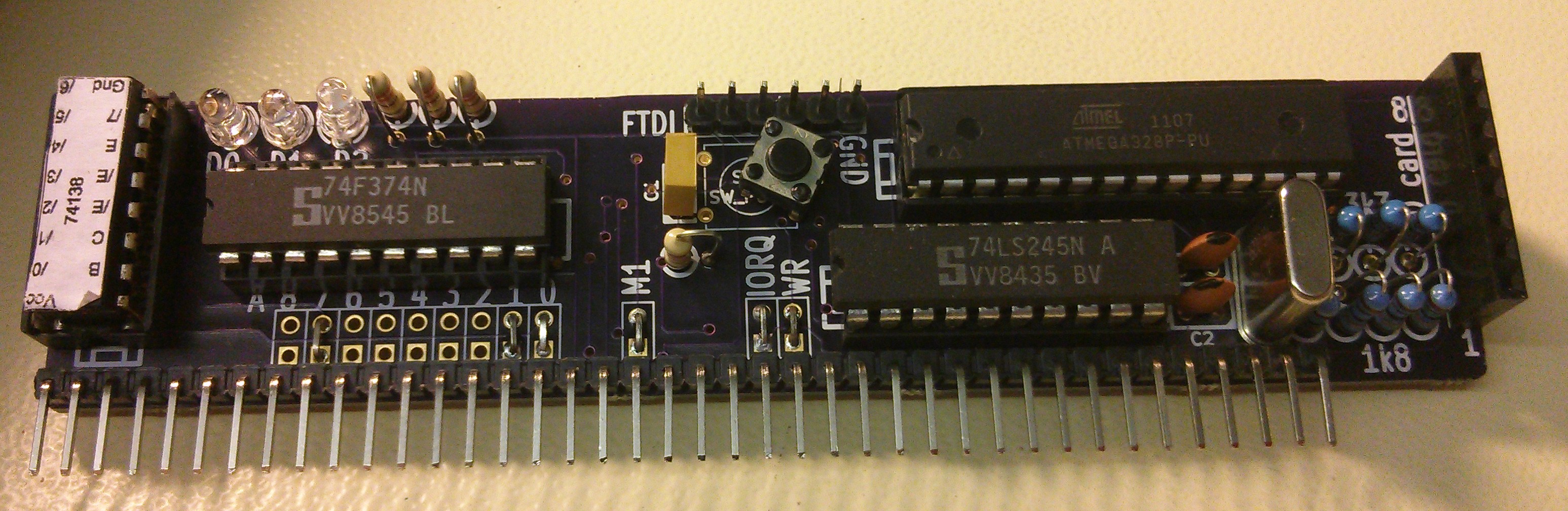
Just a quick update to about the SD Bootloader I designed a few posts ago. Well, the PCBs have arrived and last week I took a soldering iron to one of them and gave it a quick test
One side of the board is effectively an Arduino, so without plugging it in to the RC2014, I connected up an FTDI lead and uploaded the Arduino Blink sketch. A quick check with a multimeter and one of the pins was altenating between 5v and 0v. So far, all good!